Posts

Show the Success Message before Redirecting the Detail page on Visualforce Page

Requirement: To show the Success message before Redirecting the Detail page. On Click on Save button show the successful message after that redirect to detail page.  Solution: Create the Controller Class public class ClassName { // Create a boolean property     public boolean isChanged{get;set;}             public void SaveData(){         //Write Save/update Logic //insert/update list or object /set the boolean value as a true after list update/insert isChanged=true;         ClassName              } // This method will call after saving the record. and redirect to specify id     public pagereference redirectToRequiredPage(){         PageReference pageRef=new PageReference('/' +Recordid);         return pageRef;     } } Create the visualforce page <apex:page Contr...
How To Find Button Click Using Lightning Component

Image
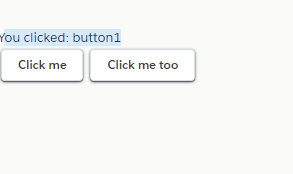
Requirement: On LC there are two buttons. Both buttons have same function how to get which button have clicked. Solution Create a component ButtonClick.cmp <!--c: ButtonClicked -> <aura:component >     <aura:attribute name="whichButton" type="String" />          <p>You clicked: {!v.whichButton}</p>     <ui:button aura:id="button1" label="Click me" press="{!c.pressMe}"/>     <ui:button aura:id="button2" label="Click me too" press="{!c. pressMe }"/> </aura:component> /*  ButtonClicked Controller.js */ ({      pressMe : function(cmp, event, helper) {         var whichOne = event.getSource().getLocalId();         console.log(whichOne);         cmp.set("v.whichButton", whichOne);     } }) Create a app Test.app for Testing <aura:application extends="force:slds"> ...

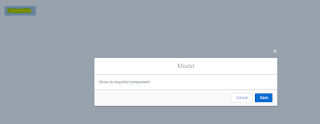
Open Model Pop Up Using Lightning Component

Image
Create the Component. Component Name: ModelPop.cmp <aura:component>          <aura:attribute name="isOpen" type="boolean" default="false"/>          <div class="slds-m-around_xx-large">         <lightning:button variant="brand"                           label="OpenPopUp"                           title=""                           onclick="{! c.openModel }" />                 <aura:if isTrue="{!v.isOpen}">             <section role="dialog" tabindex="-1" aria-labelledby="modal-heading-01" aria-modal="true" aria-describedby="modal-content-id-1" class="slds-modal slds-fade-in-open">       ...

Set Default Lightning Experience for users

Image
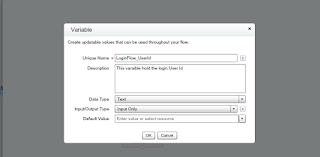
Requirement: Set Default Lighting Experience for the User based on Profile Solution: Using  Visual flow and Login flow you can achieve the solution 1) Visual Flows 2) Login Flows Step 1 : Set Up>> Flow>> New Flows Create the Variables 1) User Id 2) User Name Click on " Resources Tab " and then Double Click on Variable and fill detail as mention in snapshot Step 2 : Click on " Palette Tab " and then select the record Lookup and fill mention detail as mention below Step 3 :  This is the main step, On User object there is a standrad field UserPreferencesLightningExperiencePreferred  which one track the user is in Lightning or Classic.Setting this field to true will force the Lightning UI. And setting its value to false will force the Classic mode. Click on " Palette Tab " and then select the record Update and mention detail as mention below Step 4: Select the Screen and display the Message, T...

Roll up Amount from Child Object To Parent Object in Case of Lookup Relationship

Case : Roll up the values from Child to Parent Object in Case of Lookup Relationship. On Child Object (ChildObjectApiName__c) there is custom field Amount__c On Parent Object(ParentObjectApiName__c) there is a custom Field TotalChildAmount__c On Child Object relation ship of Parent Object is ParentObjectRealtionShipApiName__c Trigger triggerName on ChildObjectApiName__c(aftet insert, after delete, after update, after undelete) { set<id> setofParentObjectID = new set<id>(); // Storing the parent object Ids map<Id, ParentObjectApiName__c> mapofParentObjectIdToParnetObject  = new Map<Id, ParentObjectApiName__c>(); // Map is used for Storing the Parent Record Id to Parent Object if(Trigger.isInsert || Trigger.isUpdate || Trigger.isUndelete) { for(ChildObjectApiName__c objChildObject1: trigger.new) { if(objChildObject1.ParentObjectRealtionShipApiName__c != null) { setofParentObjectID.add(objChildObject1.ParentObjectRealtion...

How to Select All Fields with SOQL in Apex

How to Select All Fields with SOQL in Apex // Based on Record ID , fetch all the field particular object ID recordId = '01t90000000vQFw'; DescribeSObjectResult describeResult = recordId.getSObjectType().getDescribe(); List<String> fieldNames = new List<String>( describeResult.fields.getMap().keySet() ); System.debug( fieldNames); String query = ' SELECT ' + String.join( fieldNames, ',' ) +' FROM ' + describeResult.getName() +' WHERE ' +     ' id = :recordId ' + ' LIMIT 1 ';        // return generic list of sobjects or typecast to expected type List<SObject> records = Database.query( query ); System.debug( records ); // Based on Object without an ID, simply specify the object to then derive the sobject type     DescribeSObjectResult describeResult = SobjectApiName.getSObjectType().getDescribe(); List<String> fieldNames = new List<String>( describeResult.fields.getMap().key...

Show Pagination and Colum Sorting on VF page using Jquery Plugin

Image
Requirement:  To show Account record in table form on VF page and user able to paginate pages and sort the column: Solution:  Using Jquery Plugin you can directly implement pagination and column Sorting Download Jquery Plugin : https://sfcomponent-dev-ed.my.salesforce.com/sfc/p/#6F000001f5y8/a/6F0000004XWj/F0czOc51PF5iaC7ERZBb.cO.nU95xWyEaGcUTmPkCaU Add data table zip file in Static Resource Class Code: public class AccountController {  public List<Account> lstofacc{get;Set;}  public AccountController ()  {      lstofacc = new List<Account>([select id,AccountNo, name from account]);        } } Page Code: <apex:page controller=" AccountController  " sidebar="false" standardStylesheets="false" docType="html-5.0" tabStyle="Account"> <head> <apex:stylesheet value="{!URLFOR($Resource.DataTable,'DataTable/datatables.min.css')}" /> <apex:stylesheet value=...

Update Account Comment from Task Insertion Using Trigger

Requirement: Write a trigger to update account comment field from Task comment value on insertion of Task under Account Solution : trigger updateAccountCommentFromTask on Task (before insert) { String account_prefix = Schema.SObjectType.Account.getKeyPrefix(); Map<Id,Account> accountMap = new Map<Id,Account>(); Set<id> setofWhatID = new Set<id>(); for (Task objTask: Trigger.new)  { setofWhatID.add(objTask.WhatId); } Map<id,Account> MapAccIDToAccount = new Map<id,Account>([Select Id, Account_Status_Sales__c from Account Where Id in :setofWhatID]); for (Task objTask: Trigger.new) if(objTask.Subject != null && objTask.WhatId !=null && ((String)objTask.WhatId).startsWith(account_prefix)) { Account a = MapAccIDToAccount.get(objTask.WhatId); a.Comment__C = objTask.Comment__c; accountMap.put(a.id,a); } try { update accountMap.values(); } catch (system.Dmlexception e)  { sy...

Duplicate Prevent Lead Based On Email

Requirement : Write a trigger to prevent duplicate Email on Lead Object Solution : trigger leadDuplicatePreventer on Lead (before insert, before update) { Map<String, Lead> leadMap = new Map<String, Lead>(); for (Lead lead : System.Trigger.new) { if ((lead.Email != null) &&     (System.Trigger.isInsert || (lead.Email != System.Trigger.oldMap.get(lead.Id).Email))) { if (leadMap.containsKey(lead.Email)) {   lead.Email.addError('Another new lead has the ' + 'same email address.'); } else {      leadMap.put(lead.Email, lead);  } } } for (Lead lead : [SELECT Email FROM Lead WHERE Email IN :leadMap.KeySet()]) { Lead newLead = leadMap.get(lead.Email); newLead.Email.addError('A lead with this email ' + 'address already exists.'); } }                              Thanks,               ...

Save the Batch Error Job ID in Custom Object in case of Failure

Requirement :  Get the Failure record when processing thru batch Class Solution : Create a custom object for saving batch log errors and create a batch class   Custom Object: Batch_Log_Error__c  Custom Fields : Job_id__c,Record_Id__c,Error__c global class BatchClassName implements Database.batchable<sObject>,Schedulable{ String query ; // define Constructor global BatchClassName(){  query = 'Select id from SobjectapiName'; }  // Start Method Call    global Database.QueryLocator start(Database.BatchableContext BC){         return Database.getQueryLocator(query);    }        //  Execute Method Call global void execute(Database.BatchableContext bc, List<SobjectapiName> scope){ // Declare SobjectList and BatchErrorLoglst  list<SobjectapiName> lstofsobject  = new list<SobjectapiName>(); list<Batch_Log_Error__c> lstObjB...