Posts

Some Useful Formula Fields

1) Get Week Day CASE(  MOD( DATEVALUE( CreatedDate ) - DATE( 1990, 1, 7 ), 7 ),  0, "Sunday",  1, "Monday",  2, "Tuesday",  3, "Wednesday",  4, "Thursday",  5, "Friday",  "Saturday"  ) 2) Get Month Year Based on PickList Values if(  ispickval(Status__c,'THIS_MONTH'),  (case(Month(Date__c),  1,"JAN",  2,"FEB",  3,"MARCH",  4,"APRIL",  5,"MAY",  6,"JUNE",  7,"JULY",  8,"AUG",  9,"SEP",  10,"OCT",  11,"NOV",  12,"DEC", " "  ) +'-'+ TEXT(year(Date__c))) ,  if(ispickval(Status__c,'NEXT_MONTH'),  (case(Month(Date__c) + 1 ,  1,"JAN",  2,"FEB",  3,"MARCH",  4,"APRIL",  5,"MAY",  6,"JUNE",  7,"JULY",  8,"AUG",  9,"SEP",  10,"OCT",...
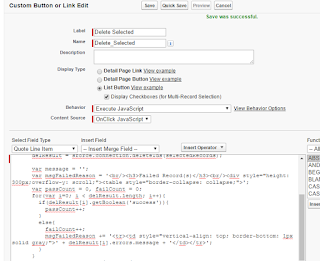
Deleted Selected multiple Row from Releated list using custom button

Image
Create a Custom button as a List Type Button and Execute JavaScript Code {!REQUIRESCRIPT('/soap/ajax/29.0/connection.js')} try {   var selectedRecords = {!GETRECORDIDS( $ObjectType.QuoteLineItem )};   if(selectedRecords.length < 1)     alert('Please Select at Least One Row !');   else   {     userConsent = confirm(selectedRecords.length + ' Record(s) will be Deleted. Continue ? ');     if(userConsent == true)     {       delResult = sforce.connection.deleteIds(selectedRecords);              var message = '';       var msgFailedReason = '<br/><h3>Failed Record(s)</h3><br/><div style="height: 300px;overflow-y: scroll;"><table style="border-collapse: collapse;">';       var passCount = 0, failCount = 0;       for(var i=0; i < delResult.length; i++){       ...

Add and Delete Row functionality using wrapper class

Image
Page Code <apex:page controller="AddandDeleteController">     <apex:form >             <apex:pageBlock title="Account Records">         <apex:pageMessages ></apex:pageMessages>             <apex:pageBlockButtons location="top">                 <apex:commandButton value="Add Row" action="{!addRow}" reRender="table" immediate="true"/>             </apex:pageBlockButtons>                 <apex:pageBlockTable value="{!accountwrapperList}" var="page" id="table">                      <apex:column headerValue="Name">                         <apex:inputField value="{!page.account.name}"/>   ...

Open Pop Up Box without using CSS

Image
Page Code <apex:page id="pg" controller="PopupScreenController">     <apex:form id="frm">         <apex:pageBlock title="PopUp" id="pb">             <apex:pagemessages id="msg"/>             <apex:commandButton value="Show Screen" onclick="opnePopup();" Oncomplete="refresh"/>                              <script type="text/javascript">                     var PopupBox;                     var strreason;                     var strcomment;                     PopupBox  = new SimpleDialog("test",false);                     Pop...

Open Pop up window as a visualforce on Click on Custom Button

Requirement :  Create a Custom Button on detail page, when user click on this a visualforce page will open as like popup. Solution :  Note : Create a visualforce Page Step 1 : Download the zip file from given below link https://docs.google.com/uc?export=download&id=0B36Q9KSdCf-6N0wtV2tUUDRCTmM Step 2 : upload this file in static resource  Static resource Name:  jQueryForPopup. Step   3: Create a custom button, behaviour (Execute JavaScript) Java script code for  custom button: {!REQUIRESCRIPT('/soap/ajax/26.0/connection.js')} {!REQUIRESCRIPT('/js/functions.js')} {!REQUIRESCRIPT('/resource/jQueryForPopup/jQuery/jquery-1.8.2.min.js')} {!REQUIRESCRIPT('/resource/jQueryForPopup/jQuery/ui/jquery-ui-1.9.1.custom.min.js')} {!REQUIRESCRIPT('/resource/jQueryForPopup/jQuery/postmessage/jquery.ba-postmessage.js')} {!REQUIRESCRIPT('/resource/jQueryForPopup/jQuery/bbq/jquery.ba-bbq.min.js')} requireCssFile('/resource/...

Download Visualforce Page Content in Excel File

Requirement: Click on output link download the visual force page content   Visualforce Page Code <apex:page controller="ClassController" sidebar="false" contentType="{!strContentType}">        <apex:form >           <apex:pageBlock id="pgBlock">            <apex:outputPanel rendered="{!flag}">                <apex:outputPanel id="OutPanelID" rendered="{!isDownloadPanel}">                  <apex:commandLink action="{!ExportData}" hreflang="apex/VFPageName" value="Download Report" style="margin-left: 560px;color:blue;"/>                </apex:outputPanel>                      <table  border="1">                     ...

How to remove and Delete row from PageBlock table on VF page

<apex:page controller="Classname" sidebar="false">    <style> .Processing { position: fixed; background: url('/img/loading32.gif'); background-repeat: no-repeat; background-position: center; width: 100%; height: 100%; z-index: 1004; left: 0%; top: 0%; } </style> <apex:Form id="frmId"> <apex:actionstatus id="statusProcessing" startstyleclass="Processing"></apex:actionstatus> <apex:pageBlock id="blockTD"> <apex:variable var="delrowNumber" value="{!0}"/>  <apex:pageBlockTable value="{!lstofData}" var="objTB"> <apex:column headerValue="Action"> <apex:commandLink value="Del" style="color:red" action="{!delRow}" immediate="true" reRender="blockTD" status="statusProcessing" > <ap...

Only Number enter in Input text on VF page

Using javascript you can validate only number will be enter in text box <apex:page> <script>    function numbersonly(e)         {              var unicode=e.charCode? e.charCode : e.keyCode;                if (unicode!=8 )             {                  if ((unicode<48||unicode>57))                        return false;                              }                   }                       </script> <apex:form> <apex:inputText value="{!xxx}" onkeypress="return numbersonly(event);"> </apex:form> <apex:pa...

Roll up Contact on Account

trigger updateContactCountonAccount on Contact (after insert,after Delete) { Set<ID> setofAccId = new Set<Id>(); Map<Id,List<Contact>> MapAccIDTOListOfCont = new Map<Id,List<Contact>>(); Map<ID,Account> MapIDToAccount = new Map<Id,Account>(); if(Trigger.isAfter && Trigger.isInsert) { for(Contact ObjCOn: trigger.new) { if(ObjCOn.AccountId !=null) { setofAccId.add(ObjCOn.AccountId); } } } if(Trigger.isAfter && Trigger.isDelete) { for(Contact ObjCOn: trigger.old) { if(ObjCOn.AccountId !=null) { setofAccId.add(ObjCOn.AccountId); } } } for(Account objAcc:[Select Id from Account where ID IN:setofAccId]) { MapIDToAccount.put(objAcc.ID,objAcc); } for(Contact objCon:[Select id , Name,AccountId from Contact where Accou...

Remove "-None-" value from Visualforce Page in Standard and Custom Pick List Values

Solution  There are Two Solution to  Remove "-None-" value from salesforce standard and custom Selected Picklist field. 1) Do "Required" In Visualforce Page means Required= "true" or On Pagelayout Required CheckBox true. 2) Using Jquery <apex:page standardController="Case">     <apex:form>         <script type='text/javascript' src= '//ajax.googleapis.com/ajax/libs/jquery/1.6.2/jquery.min.js'>         </script>         <script language="javascript">             $(function() {                         $('select.RemoveNoneValue option[value=]').remove();                    });         </script>             <apex:inputField styleClass="RemoveNoneValue" value="{!Case.Stat...