Call Rest Api and Json Parsing in Salesforce
Requirement:
To Call Current weather api show data on VF page, Based on Search City
Solution:
Call the rest api and parse the json and one more thing add End Point url in Remote Site Setting
First Step:
Create a Class and Parse the JSON data
Create Class: CurrentDayWeatherApiController
Class Code:
public class CurrentDayWeatherApiController {
public string cityName{get;set;}
// public boolean showpanel{get;set;}
public List<weatherRecords> WeathersList{get; set;}
public CurrentDayWeatherApiController()
{
}
public void ShowWeather()
{
try
{
if(cityName!=null && cityName!='')
{
string endPointURL = 'http://api.openweathermap.org/data/2.5/find?q='+cityName;
Httprequest req = new Httprequest();
req.setEndpoint(endPointURL);
req.setMethod('GET');
//req.setHeader('Authorization', 'Basic ' + encodedAuthentication);
Httpresponse response = new Httpresponse();
if(Test.isRunningTest()){
response.setStatusCode(200);
response.setBody('{"message":"accurate","cod":"200","count":1,"list":[{"id":7279746,"name":"Noida","coord":{"lon":77.330002,"lat":28.58},"main":{"temp":313.09,"temp_min":313.09,"temp_max":313.09,"pressure":991.92,"sea_level":1015.98,"grnd_level":991.92,"humidity":29},"dt":1431845612,"wind":{"speed":3.96,"deg":274.504},"sys":{"country":"IN"},"clouds":{"all":0},"weather":[{"id":800,"main":"Clear","description":"Sky is Clear","icon":"01d"}]}]}');
}
else
{
response = MakeCall(req);
}
if(response.getStatusCode() == 200){
system.debug('EMailStatusCode200');
String repWeatherBody = response.getBody();
system.debug('***repWeatherBody***'+repWeatherBody);
// list is salesforce keyword so we need to replace it another string
repWeatherBody = repWeatherBody.replace('list','xyz_list');
system.debug('***ReplacerepWeatherBody***'+repWeatherBody);
ShowWeatherData.ShowWeather objClsResponse = (ShowWeatherData.ShowWeather)JSON.deserialize(repWeatherBody, ShowWeatherData.ShowWeather.class);
system.debug('***objClsEmailResponse***'+objClsResponse);
WeathersList = new List<weatherRecords>();
weatherRecords wR = new weatherRecords();
wR.msg = objClsResponse.message;
wR.name = objClsResponse.xyz_list[0].name;
wR.lon = objClsResponse.xyz_list[0].coord.lon;
WeathersList.add(wR);
}
if(WeathersList.size()<=0 && WeathersList==null)
{
ApexPages.addMessage(new ApexPages.Message(ApexPages.Severity.Error, 'No Record Found'));
}
}
else
{
ApexPages.addMessage(new ApexPages.Message(ApexPages.Severity.Error, 'Please Enter the City Name'));
}
}
catch(exception ee){
ApexPages.addMessage(new ApexPages.Message(ApexPages.Severity.ERROR, ee.getMessage()));
}
}
public static HttpResponse MakeCall(Httprequest req){
HttpResponse resObj = new HttpResponse();
Http ht = new Http();
if(!Test.isRunningTest()){
resObj = ht.send(req);
}else{
return null;
}
return resObj;
}
public class weatherRecords{
public string msg{get;set;}
public string name{get;set;}
public string lon{get;set;}
}
}
PageCode
<apex:page controller="CurrentDayWeatherApiController">
<style>
.statusStyle {
background: url(/img/loading.gif) no-repeat 0 0;
padding-left: 28px;
margin-left: 680px;
margin-top: 20px;
line-height: 40px;
background-size: 22px 22px;
position: fixed;
}
</style>
<apex:form id="frmID">
<apex:pagemessages id="dd"/>
<apex:actionStatus id="actionStatus" startText="Loading......... " stopText="" startStyleClass="statusStyle"/>
<apex:pageBlock id="PBlockID">
<apex:pageBlockSection >
Enter City Name <apex:inputText value="{!cityName }"/>
</apex:pageBlockSection>
<apex:pageBlockButtons location="bottom">
<apex:commandButton value="Show" action="{!ShowWeather}" reRender="PBDatID,frmID" status="actionStatus"/>
</apex:pageBlockButtons>
</apex:pageBlock>
<apex:pageBlock id="PBDatID" > <!-- rendered="{!if(WeathersList!= null && WeathersList.size > 0,true, false)}" -->
<apex:pageBlockTable value="{!WeathersList}" var="Obj" id="PbID" >
<apex:column headerValue="Message" value="{!Obj.msg}"/>
<apex:column headerValue="Name" value="{!Obj.name}"/>
<apex:column headerValue="Lon" value="{!Obj.lon}"/>
</apex:pageBlockTable>
</apex:pageBlock>
</apex:form>
</apex:page>
Create New Class Parsing JSON Class
Class Name : ShowWeatherData
//----------------JSON FORMAT----------------------------------
/*
{
"message":"accurate",
"cod":"200",
"count":1,
"list":
[
{
"id":7279746,
"name":"Noida",
"coord":
{
"lon":77.330002,
"lat":28.58
},
"main":
{
"temp":314.512,
"temp_min":314.512,
"temp_max":314.512,
"pressure":988.93,
"sea_level":1012.81,
"grnd_level":988.93,
"humidity":30
},
"dt":1431935618,
"wind":
{
"speed":4.57,
"deg":283.501
},
"sys":
{
"country":"IN"
},
"clouds":
{
"all":0
},
"weather":
[
{
"id":800,
"main":"Clear",
"description":"Sky is Clear",
"icon":"01d"
}
]
}
]
*/
//-------------------------------------End Code--------------------------------------------
Public Class ShowWeatherData
{
Public Class ShowWeather
{
Public String message{get;set;}
Public String cod{get;set;}
Public integer count{get;set;}
Public ListResult[] xyz_list{get;set;}
}
public Class ListResult
{
Public String name{get;set;}
Public String id{get;set;}
public coordResult coord{get;set;}
}
public Class coordResult
{
public string lon{get;set;}
}
}
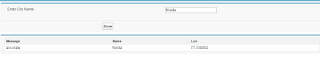
SnapShot
To Call Current weather api show data on VF page, Based on Search City
Solution:
Call the rest api and parse the json and one more thing add End Point url in Remote Site Setting
First Step:
Create a Class and Parse the JSON data
Create Class: CurrentDayWeatherApiController
Class Code:
public class CurrentDayWeatherApiController {
public string cityName{get;set;}
// public boolean showpanel{get;set;}
public List<weatherRecords> WeathersList{get; set;}
public CurrentDayWeatherApiController()
{
}
public void ShowWeather()
{
try
{
if(cityName!=null && cityName!='')
{
string endPointURL = 'http://api.openweathermap.org/data/2.5/find?q='+cityName;
Httprequest req = new Httprequest();
req.setEndpoint(endPointURL);
req.setMethod('GET');
//req.setHeader('Authorization', 'Basic ' + encodedAuthentication);
Httpresponse response = new Httpresponse();
if(Test.isRunningTest()){
response.setStatusCode(200);
response.setBody('{"message":"accurate","cod":"200","count":1,"list":[{"id":7279746,"name":"Noida","coord":{"lon":77.330002,"lat":28.58},"main":{"temp":313.09,"temp_min":313.09,"temp_max":313.09,"pressure":991.92,"sea_level":1015.98,"grnd_level":991.92,"humidity":29},"dt":1431845612,"wind":{"speed":3.96,"deg":274.504},"sys":{"country":"IN"},"clouds":{"all":0},"weather":[{"id":800,"main":"Clear","description":"Sky is Clear","icon":"01d"}]}]}');
}
else
{
response = MakeCall(req);
}
if(response.getStatusCode() == 200){
system.debug('EMailStatusCode200');
String repWeatherBody = response.getBody();
system.debug('***repWeatherBody***'+repWeatherBody);
// list is salesforce keyword so we need to replace it another string
repWeatherBody = repWeatherBody.replace('list','xyz_list');
system.debug('***ReplacerepWeatherBody***'+repWeatherBody);
ShowWeatherData.ShowWeather objClsResponse = (ShowWeatherData.ShowWeather)JSON.deserialize(repWeatherBody, ShowWeatherData.ShowWeather.class);
system.debug('***objClsEmailResponse***'+objClsResponse);
WeathersList = new List<weatherRecords>();
weatherRecords wR = new weatherRecords();
wR.msg = objClsResponse.message;
wR.name = objClsResponse.xyz_list[0].name;
wR.lon = objClsResponse.xyz_list[0].coord.lon;
WeathersList.add(wR);
}
if(WeathersList.size()<=0 && WeathersList==null)
{
ApexPages.addMessage(new ApexPages.Message(ApexPages.Severity.Error, 'No Record Found'));
}
}
else
{
ApexPages.addMessage(new ApexPages.Message(ApexPages.Severity.Error, 'Please Enter the City Name'));
}
}
catch(exception ee){
ApexPages.addMessage(new ApexPages.Message(ApexPages.Severity.ERROR, ee.getMessage()));
}
}
public static HttpResponse MakeCall(Httprequest req){
HttpResponse resObj = new HttpResponse();
Http ht = new Http();
if(!Test.isRunningTest()){
resObj = ht.send(req);
}else{
return null;
}
return resObj;
}
public class weatherRecords{
public string msg{get;set;}
public string name{get;set;}
public string lon{get;set;}
}
}
PageCode
<apex:page controller="CurrentDayWeatherApiController">
<style>
.statusStyle {
background: url(/img/loading.gif) no-repeat 0 0;
padding-left: 28px;
margin-left: 680px;
margin-top: 20px;
line-height: 40px;
background-size: 22px 22px;
position: fixed;
}
</style>
<apex:form id="frmID">
<apex:pagemessages id="dd"/>
<apex:actionStatus id="actionStatus" startText="Loading......... " stopText="" startStyleClass="statusStyle"/>
<apex:pageBlock id="PBlockID">
<apex:pageBlockSection >
Enter City Name <apex:inputText value="{!cityName }"/>
</apex:pageBlockSection>
<apex:pageBlockButtons location="bottom">
<apex:commandButton value="Show" action="{!ShowWeather}" reRender="PBDatID,frmID" status="actionStatus"/>
</apex:pageBlockButtons>
</apex:pageBlock>
<apex:pageBlock id="PBDatID" > <!-- rendered="{!if(WeathersList!= null && WeathersList.size > 0,true, false)}" -->
<apex:pageBlockTable value="{!WeathersList}" var="Obj" id="PbID" >
<apex:column headerValue="Message" value="{!Obj.msg}"/>
<apex:column headerValue="Name" value="{!Obj.name}"/>
<apex:column headerValue="Lon" value="{!Obj.lon}"/>
</apex:pageBlockTable>
</apex:pageBlock>
</apex:form>
</apex:page>
Create New Class Parsing JSON Class
Class Name : ShowWeatherData
//----------------JSON FORMAT----------------------------------
/*
{
"message":"accurate",
"cod":"200",
"count":1,
"list":
[
{
"id":7279746,
"name":"Noida",
"coord":
{
"lon":77.330002,
"lat":28.58
},
"main":
{
"temp":314.512,
"temp_min":314.512,
"temp_max":314.512,
"pressure":988.93,
"sea_level":1012.81,
"grnd_level":988.93,
"humidity":30
},
"dt":1431935618,
"wind":
{
"speed":4.57,
"deg":283.501
},
"sys":
{
"country":"IN"
},
"clouds":
{
"all":0
},
"weather":
[
{
"id":800,
"main":"Clear",
"description":"Sky is Clear",
"icon":"01d"
}
]
}
]
*/
//-------------------------------------End Code--------------------------------------------
Public Class ShowWeatherData
{
Public Class ShowWeather
{
Public String message{get;set;}
Public String cod{get;set;}
Public integer count{get;set;}
Public ListResult[] xyz_list{get;set;}
}
public Class ListResult
{
Public String name{get;set;}
Public String id{get;set;}
public coordResult coord{get;set;}
}
public Class coordResult
{
public string lon{get;set;}
}
}
SnapShot

Thanks
Sumit Shukla
sumitshukla.mca@gmail.com
skypeId: shuklasumit1
mob: 9711055997
cccinfotech.com
Comments
Post a Comment