Create Custom Lookup in salesforce
Requirement: Create a custom Lookup
Solution: you need to create two visual force page
Create first VF Page and Class
Page Code
<apex:page controller="LookupMainControllerForFilter" tabstyle="Account">
<script>
var newWin=null;
function openLookupPopup(name, id)
{
var url="/apex/LookupExamplePopup?namefield=" + name + "&idfield=" + id;
newWin=window.open(url, 'Popup','height=500,width=600,left=100,top=100,resizable=no,scrollbars=yes,toolbar=no,status=no');
if (window.focus)
{
newWin.focus();
}
return false;
}
function closeLookupPopup()
{
if (null!=newWin)
{
newWin.close();
}
}
</script>
<apex:form >
<apex:pageBlock title="Lookup">
<apex:pageBlockSection columns="1">
<apex:pageBlockSectionitem >
<apex:outputLabel value="Account"/>
<apex:outputPanel >
<apex:inputHidden value="{!accountId}" id="targetId" />
<apex:inputText size="40" value="{!accountName}" id="targetName" onFocus="this.blur()" disabled="false"/> <a href="#" onclick="openLookupPopup('{!$Component.targetName}', '{!$Component.targetId}'); return false">Lookup</a>
</apex:outputPanel>
</apex:pageBlockSectionitem>
</apex:pageBlockSection>
<apex:pageBlockSection >
<apex:pageBlockSectionitem >
<apex:commandButton value="Get Contacts" action="{!findContacts}"/>
</apex:pageBlockSectionitem>
</apex:pageBlockSection>
</apex:pageBlock>
</apex:form>
<apex:pageBlock title="Contacts">
<apex:pageBlockTable value="{!contacts}" var="contact">
<apex:column headerValue="First" value="{!contact.FirstName}"/>
<apex:column headerValue="Last" value="{!contact.LastName}"/>
</apex:pageBlockTable>
</apex:pageBlock>
</apex:page>
Class Code
//
// Custom controller for lookup example main page
//
public with sharing class LookupMainControllerForFilter
{
public String accountName {get; set;}
public Id accountId {get; set;}
public List<Contact> contacts {get;set;}
public PageReference findContacts()
{
if (null!=accountId)
{
contacts=[select id,FirstName, LastName from Contact where AccountId=:accountId];
}
return null;
}
}
-----------------------------------------------------------------------------------------------------------
Second VF page and Class Code
Page Code
<apex:page controller="LookupPopupController" sidebar="false" showheader="false">
<script language="javascript">
window.onload = new function()
{
// bring popup window to front
window.focus();
var ele=document.getElementById('{!$Component.form.block.section.query}');
if (ele)
{
ele.focus();
}
}
function fillIn(name, id)
{
var winMain=window.opener;
if (null==winMain)
{
winMain=window.parent.opener;
}
var ele=winMain.document.getElementById('{!$CurrentPage.parameters.namefield}');
ele.value=name;
ele=winMain.document.getElementById('{!$CurrentPage.parameters.idfield}');
ele.value=id;
CloseWindow();
}
function CloseWindow()
{
var winMain=window.opener;
if (null==winMain)
{
winMain=window.parent.opener;
}
winMain.closeLookupPopup();
}
</script>
<apex:messages />
<apex:form id="form" >
<div style="width 100%">
<apex:pageBlock title="Lookup" id="block">
<apex:pageBlockSection id="section">
Enter search text and click Go<br/>
<apex:inputText value="{!query}" id="query"/>
<apex:commandButton value="Go" action="{!runQuery}"/>
</apex:pageBlockSection>
</apex:pageBlock>
<apex:pageBlock >
<apex:pageBlockSection columns="1">
<apex:pageBlockTable value="{!accounts}" var="account">
<apex:column headerValue="Name">
<apex:outputLink value="#" onclick="fillIn('{!account.Name}', '{!account.id}')">{!account.Name}</apex:outputLink>
</apex:column>
<apex:column headerValue="Street" value="{!account.BillingStreet}"/>
<apex:column headerValue="City" value="{!account.BillingCity}"/>
<apex:column headerValue="Postcode" value="{!account.BillingPostalCode}"/>
</apex:pageBlockTable>
</apex:pageBlockSection>
</apex:pageBlock>
<button type="button" onclick="CloseWindow();">Close Window</button>
</div>
</apex:form>
</apex:page>
Class Code
//
// Custom controller for lookup example popup page
//
public with sharing class LookupPopupController
{
public String query {get; set;}
public List<Account> accounts {get; set;}
public PageReference runQuery()
{
List<List<Account>> searchResults=[FIND :query IN ALL FIELDS RETURNING Account (id, name, billingstreet, billingcity, billingpostalcode)];
accounts=searchResults[0];
return null;
}
}
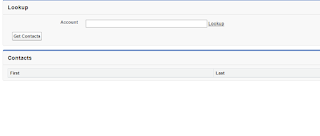
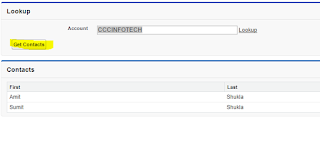
SnapShots
First


Solution: you need to create two visual force page
Create first VF Page and Class
Page Code
<apex:page controller="LookupMainControllerForFilter" tabstyle="Account">
<script>
var newWin=null;
function openLookupPopup(name, id)
{
var url="/apex/LookupExamplePopup?namefield=" + name + "&idfield=" + id;
newWin=window.open(url, 'Popup','height=500,width=600,left=100,top=100,resizable=no,scrollbars=yes,toolbar=no,status=no');
if (window.focus)
{
newWin.focus();
}
return false;
}
function closeLookupPopup()
{
if (null!=newWin)
{
newWin.close();
}
}
</script>
<apex:form >
<apex:pageBlock title="Lookup">
<apex:pageBlockSection columns="1">
<apex:pageBlockSectionitem >
<apex:outputLabel value="Account"/>
<apex:outputPanel >
<apex:inputHidden value="{!accountId}" id="targetId" />
<apex:inputText size="40" value="{!accountName}" id="targetName" onFocus="this.blur()" disabled="false"/> <a href="#" onclick="openLookupPopup('{!$Component.targetName}', '{!$Component.targetId}'); return false">Lookup</a>
</apex:outputPanel>
</apex:pageBlockSectionitem>
</apex:pageBlockSection>
<apex:pageBlockSection >
<apex:pageBlockSectionitem >
<apex:commandButton value="Get Contacts" action="{!findContacts}"/>
</apex:pageBlockSectionitem>
</apex:pageBlockSection>
</apex:pageBlock>
</apex:form>
<apex:pageBlock title="Contacts">
<apex:pageBlockTable value="{!contacts}" var="contact">
<apex:column headerValue="First" value="{!contact.FirstName}"/>
<apex:column headerValue="Last" value="{!contact.LastName}"/>
</apex:pageBlockTable>
</apex:pageBlock>
</apex:page>
Class Code
//
// Custom controller for lookup example main page
//
public with sharing class LookupMainControllerForFilter
{
public String accountName {get; set;}
public Id accountId {get; set;}
public List<Contact> contacts {get;set;}
public PageReference findContacts()
{
if (null!=accountId)
{
contacts=[select id,FirstName, LastName from Contact where AccountId=:accountId];
}
return null;
}
}
-----------------------------------------------------------------------------------------------------------
Second VF page and Class Code
Page Code
<apex:page controller="LookupPopupController" sidebar="false" showheader="false">
<script language="javascript">
window.onload = new function()
{
// bring popup window to front
window.focus();
var ele=document.getElementById('{!$Component.form.block.section.query}');
if (ele)
{
ele.focus();
}
}
function fillIn(name, id)
{
var winMain=window.opener;
if (null==winMain)
{
winMain=window.parent.opener;
}
var ele=winMain.document.getElementById('{!$CurrentPage.parameters.namefield}');
ele.value=name;
ele=winMain.document.getElementById('{!$CurrentPage.parameters.idfield}');
ele.value=id;
CloseWindow();
}
function CloseWindow()
{
var winMain=window.opener;
if (null==winMain)
{
winMain=window.parent.opener;
}
winMain.closeLookupPopup();
}
</script>
<apex:messages />
<apex:form id="form" >
<div style="width 100%">
<apex:pageBlock title="Lookup" id="block">
<apex:pageBlockSection id="section">
Enter search text and click Go<br/>
<apex:inputText value="{!query}" id="query"/>
<apex:commandButton value="Go" action="{!runQuery}"/>
</apex:pageBlockSection>
</apex:pageBlock>
<apex:pageBlock >
<apex:pageBlockSection columns="1">
<apex:pageBlockTable value="{!accounts}" var="account">
<apex:column headerValue="Name">
<apex:outputLink value="#" onclick="fillIn('{!account.Name}', '{!account.id}')">{!account.Name}</apex:outputLink>
</apex:column>
<apex:column headerValue="Street" value="{!account.BillingStreet}"/>
<apex:column headerValue="City" value="{!account.BillingCity}"/>
<apex:column headerValue="Postcode" value="{!account.BillingPostalCode}"/>
</apex:pageBlockTable>
</apex:pageBlockSection>
</apex:pageBlock>
<button type="button" onclick="CloseWindow();">Close Window</button>
</div>
</apex:form>
</apex:page>
Class Code
//
// Custom controller for lookup example popup page
//
public with sharing class LookupPopupController
{
public String query {get; set;}
public List<Account> accounts {get; set;}
public PageReference runQuery()
{
List<List<Account>> searchResults=[FIND :query IN ALL FIELDS RETURNING Account (id, name, billingstreet, billingcity, billingpostalcode)];
accounts=searchResults[0];
return null;
}
}
SnapShots
First

Second

Third

Fouth

Fifth

Thanks
Sumit Shukla
Mob:9711055997
sumitshukla.mca@gmail.com

Comments
Post a Comment