Show All custom and standard Object and respective field on VF Page
Requirement: Provide a option on vf page that user can select any custom or standard object
and create slelected SOQL query and get records according to selected fields
Solution:
Controller Class:
public class clsCustStandObj
{
public PageReference checkAll1() {
return null;
}
public PageReference checkAll2() {
return null;
}
public string SelectedValue{get;set;}
public string SelectedObject{get;set;}
public List<SelectOption> lstofObj{get;set;}
public List<SelectOption> lstofAllselectedObj{get;set;}
public List<string> lstofAllfieldAndName{get;set;}
public List<WrapperClass> lstofStandardField{get;set;}
public List<WrapperClass> lstofCustomField{get;set;}
public List<string> lstofselectedfield{get;set;}
public string allselfield{get;set;}
public List<SObject> lstgetresult{get;set;}
public List<String> lstgetresult1{get;set;}
public List<String> lst{get;set;}
public clsCustStandObj ()
{
lstofObj=new List<SelectOption>();
lstofObj.add(new SelectOption('None','--Select None--'));
lstofObj.add(new SelectOption('All','All'));
lstofObj.add(new SelectOption('Custom','Custom'));
lstofObj.add(new SelectOption('Standard','Standard'));
lstofAllselectedObj = new List<SelectOption>();
lstofAllselectedObj.add(new SelectOption('Select None','--Select None--'));
}
Public void ReleateListOfCustAndStanObj()
{
Map<String, Schema.SObjectType> gd = Schema.getGlobalDescribe();
lstofAllselectedObj = new List<SelectOption>();
lstofAllselectedObj.add(new SelectOption('Select None','--Select None--'));
for(Schema.SobjectType obj:gd.values())
{
if(SelectedValue=='All')
{
lstofAllselectedObj.add(new SelectOption(obj.getDescribe().getName(),obj.getDescribe().getLabel()));
}
else if(SelectedValue=='custom')
{
if(obj.getDescribe().isCustom()==true)
{
lstofAllselectedObj.add(new SelectOption(obj.getDescribe().getName(),obj.getDescribe().getLabel()));
}
}
else if(SelectedValue=='Standard')
{
if(obj.getDescribe().isCustom()==false)
{
lstofAllselectedObj.add(new SelectOption(obj.getDescribe().getName(),obj.getDescribe().getLabel()));
}
}
}
}
public void showFieldsAndRecords()
{
lstofCustomField = new List<WrapperClass>();
lstofStandardField= new List<WrapperClass>();
if(SelectedObject!='Select None')
{
lstofAllfieldAndName = new List<String>();
Map<string, Schema.SObjectType> mapOfAllObj = Schema.getGlobalDescribe();
Schema.SObjectType sot = mapofAllObj.get(SelectedObject);
Schema.DescribeSobjectResult Dsr = sot .getDescribe();
for(Schema.SObjectField sof: Dsr.fields.getmap().values())
{
lstofAllfieldAndName.add(sof.getDescribe().getLabel());
WrapperClass wcObj = new WrapperClass();
wcObj.selected= false;
wcObj.labelName= sof.getDescribe().getLabel();
wcObj.fieldApi= sof.getDescribe().getName();
if(sof.getDescribe().isCustom()==true)
{
lstofCustomField.add(wcObj);
}
else if(sof.getDescribe().isCustom()==false)
{
lstofStandardField.add(wcObj);
}
}
}
}
public class WrapperClass
{
public boolean selected{get;set;}
public string labelName{get;set;}
public string fieldApi{get;set;}
public wrapperClass()
{
selected = false;
labelName='';
fieldApi='';
}
}
public void showQuery()
{
lstgetresult = new List<Sobject>();
lst = new List<String>();
if(SelectedObject!='Select None')
{
allselfield ='Select ';
for(wrapperClass objs:lstofStandardField)
{
if(objs.selected==true)
{
allselfield += objs.fieldApi + ',';
lst.add(objs.fieldApi);
}
}
for(wrapperClass objc: lstofCustomField)
{
if(objc.selected==true)
{
allselfield += objc.fieldApi+',' ;
lst.add(objc.fieldApi);
}
}
allselfield = allselfield.removeEnd(',');
allselfield+= ' from ' + SelectedObject;
}
}
public void result()
{
if(SelectedObject!='Select None')
{
lstgetresult= Database.query(allselfield);
system.debug('The value of query:'+lstgetresult);
}
}
public void refreshPage()
{
ReleateListOfCustAndStanObj();
lstgetresult = new List<Sobject>();
lstofCustomField = new List<WrapperClass>();
lstofStandardField= new List<WrapperClass>();
allselfield='';
//checkAll1();
// checkAll2();
}
}
Vf Page
<apex:page controller="clsCustStandObj" sidebar="false" tabStyle="Account">
<meta name="google-translate-customization" content="afb3859aeab26f11-8390680e6d2f19bf-g71f10bf08db6379c-15"></meta>
<div id="google_translate_element"></div><script type="text/javascript">
function googleTranslateElementInit() {
new google.translate.TranslateElement({pageLanguage: 'en', includedLanguages: 'fr,it,ja,ur', layout: google.translate.TranslateElement.InlineLayout.SIMPLE}, 'google_translate_element');
}
</script><script type="text/javascript" src="//translate.google.com/translate_a/element.js?cb=googleTranslateElementInit"></script>
<apex:form >
<script type="text/javascript">
function checkAll1(cb1,cbid1)
{
var inputElem1 = document.getElementsByTagName("input");
for(var i=0; i<inputElem1.length; i++)
{
if(inputElem1[i].id.indexOf(cbid1)!=-1){
inputElem1[i].checked = cb1.checked;
}
}
}
function checkAll2(cb2,cbid2)
{
var inputElem2 = document.getElementsByTagName("input");
for(var i=0; i<inputElem2.length; i++)
{
if(inputElem2[i].id.indexOf(cbid2)!=-1){
inputElem2[i].checked = cb2.checked;
}
}
}
</script>
<apex:pageBlock >
<apex:pageBlockSection title="Objects">
<apex:outputLabel value="Select Type"/>
<apex:selectList size="1" value="{!SelectedValue}">
<apex:selectOptions value="{!lstofObj}"></apex:selectOptions>
<apex:actionSupport action="{!refreshPage}" event="onchange" reRender="sl,s2,s3,s4,s5"/>
</apex:selectList>
</apex:pageBlockSection>
<apex:pageBlockSection title="List Of Objects" id="pb">
<apex:outputLabel value="Select Object"/>
<apex:selectList size="1" id="sl" value="{!SelectedObject}">
<apex:selectOptions value="{!lstofAllselectedObj}"></apex:selectOptions>
<apex:actionSupport action="{!refreshPage}" event="onchange" reRender="s2,s3,s4,s5"/>
<apex:commandButton value="Show Field" action="{!showFieldsAndRecords}" reRender="pbIdofField,pdCustmField"/>
</apex:selectList>
</apex:pageBlockSection>
</apex:pageBlock>
<apex:pageBlock id="pbIdofField">
<apex:pageBlockSection title="Standard Field:">
<apex:pageBlockTable value="{!lstofStandardField}" var="sf" id="s2">
<apex:column >
<apex:facet name="header">
<apex:inputCheckbox onclick="checkAll1(this,'checkedone1')"/>
</apex:facet>
<apex:inputCheckbox value="{!sf.selected}" id="checkedone1"/>
</apex:column>
<apex:column headerValue="Label Name">{!sf.labelName} </apex:column>
<apex:column headerValue="FieldAPI Name">{!sf.fieldApi} </apex:column>
</apex:pageBlockTable>
</apex:pageBlockSection>
</apex:pageBlock>
<apex:pageBlock id="pdCustmField">
<apex:pageBlockSection title="Custom Field">
<apex:pageBlockTable value="{!lstofCustomField}" var="cf" id="s3">
<apex:column >
<apex:facet name="header">
<apex:inputCheckbox onclick="checkAll2(this,'checkedone2')"/>
</apex:facet>
<apex:inputCheckbox value="{!cf.selected}" id="checkedone2"/>
</apex:column>
<apex:column headerValue="Label Name">{!cf.labelName} </apex:column>
<apex:column headerValue="FieldAPI Name">{!cf.fieldApi} </apex:column>
</apex:pageBlockTable>
</apex:pageBlockSection>
</apex:pageBlock>
<apex:pageBlock title="Show Query of the Selected Field" id="pbofQuery">
<apex:commandButton value="Query Button" action="{!showQuery}" reRender="pbofQuery"/>
<apex:inputTextarea cols="90" rows="5" value="{!allselfield}" id="s4"/>
</apex:pageBlock>
<apex:pageBlock title="Show Selected Values" id="pbShowResult">
<apex:commandButton value="Get Result" action="{!result}" reRender="pbShowResult"/>
<apex:pageBlockTable value="{!lstgetresult}" var="x" id="s5">
<apex:repeat value="{!lst}" var="string" id="theRepeat">
<apex:column value="{!x[string]}" id="theValue"/><br/>
</apex:repeat>
</apex:pageBlockTable>
</apex:pageBlock>
</apex:form>
</apex:page>
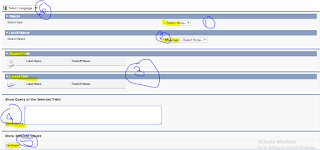
SnapShot


and create slelected SOQL query and get records according to selected fields
Solution:
Controller Class:
public class clsCustStandObj
{
public PageReference checkAll1() {
return null;
}
public PageReference checkAll2() {
return null;
}
public string SelectedValue{get;set;}
public string SelectedObject{get;set;}
public List<SelectOption> lstofObj{get;set;}
public List<SelectOption> lstofAllselectedObj{get;set;}
public List<string> lstofAllfieldAndName{get;set;}
public List<WrapperClass> lstofStandardField{get;set;}
public List<WrapperClass> lstofCustomField{get;set;}
public List<string> lstofselectedfield{get;set;}
public string allselfield{get;set;}
public List<SObject> lstgetresult{get;set;}
public List<String> lstgetresult1{get;set;}
public List<String> lst{get;set;}
public clsCustStandObj ()
{
lstofObj=new List<SelectOption>();
lstofObj.add(new SelectOption('None','--Select None--'));
lstofObj.add(new SelectOption('All','All'));
lstofObj.add(new SelectOption('Custom','Custom'));
lstofObj.add(new SelectOption('Standard','Standard'));
lstofAllselectedObj = new List<SelectOption>();
lstofAllselectedObj.add(new SelectOption('Select None','--Select None--'));
}
Public void ReleateListOfCustAndStanObj()
{
Map<String, Schema.SObjectType> gd = Schema.getGlobalDescribe();
lstofAllselectedObj = new List<SelectOption>();
lstofAllselectedObj.add(new SelectOption('Select None','--Select None--'));
for(Schema.SobjectType obj:gd.values())
{
if(SelectedValue=='All')
{
lstofAllselectedObj.add(new SelectOption(obj.getDescribe().getName(),obj.getDescribe().getLabel()));
}
else if(SelectedValue=='custom')
{
if(obj.getDescribe().isCustom()==true)
{
lstofAllselectedObj.add(new SelectOption(obj.getDescribe().getName(),obj.getDescribe().getLabel()));
}
}
else if(SelectedValue=='Standard')
{
if(obj.getDescribe().isCustom()==false)
{
lstofAllselectedObj.add(new SelectOption(obj.getDescribe().getName(),obj.getDescribe().getLabel()));
}
}
}
}
public void showFieldsAndRecords()
{
lstofCustomField = new List<WrapperClass>();
lstofStandardField= new List<WrapperClass>();
if(SelectedObject!='Select None')
{
lstofAllfieldAndName = new List<String>();
Map<string, Schema.SObjectType> mapOfAllObj = Schema.getGlobalDescribe();
Schema.SObjectType sot = mapofAllObj.get(SelectedObject);
Schema.DescribeSobjectResult Dsr = sot .getDescribe();
for(Schema.SObjectField sof: Dsr.fields.getmap().values())
{
lstofAllfieldAndName.add(sof.getDescribe().getLabel());
WrapperClass wcObj = new WrapperClass();
wcObj.selected= false;
wcObj.labelName= sof.getDescribe().getLabel();
wcObj.fieldApi= sof.getDescribe().getName();
if(sof.getDescribe().isCustom()==true)
{
lstofCustomField.add(wcObj);
}
else if(sof.getDescribe().isCustom()==false)
{
lstofStandardField.add(wcObj);
}
}
}
}
public class WrapperClass
{
public boolean selected{get;set;}
public string labelName{get;set;}
public string fieldApi{get;set;}
public wrapperClass()
{
selected = false;
labelName='';
fieldApi='';
}
}
public void showQuery()
{
lstgetresult = new List<Sobject>();
lst = new List<String>();
if(SelectedObject!='Select None')
{
allselfield ='Select ';
for(wrapperClass objs:lstofStandardField)
{
if(objs.selected==true)
{
allselfield += objs.fieldApi + ',';
lst.add(objs.fieldApi);
}
}
for(wrapperClass objc: lstofCustomField)
{
if(objc.selected==true)
{
allselfield += objc.fieldApi+',' ;
lst.add(objc.fieldApi);
}
}
allselfield = allselfield.removeEnd(',');
allselfield+= ' from ' + SelectedObject;
}
}
public void result()
{
if(SelectedObject!='Select None')
{
lstgetresult= Database.query(allselfield);
system.debug('The value of query:'+lstgetresult);
}
}
public void refreshPage()
{
ReleateListOfCustAndStanObj();
lstgetresult = new List<Sobject>();
lstofCustomField = new List<WrapperClass>();
lstofStandardField= new List<WrapperClass>();
allselfield='';
//checkAll1();
// checkAll2();
}
}
Vf Page
<apex:page controller="clsCustStandObj" sidebar="false" tabStyle="Account">
<meta name="google-translate-customization" content="afb3859aeab26f11-8390680e6d2f19bf-g71f10bf08db6379c-15"></meta>
<div id="google_translate_element"></div><script type="text/javascript">
function googleTranslateElementInit() {
new google.translate.TranslateElement({pageLanguage: 'en', includedLanguages: 'fr,it,ja,ur', layout: google.translate.TranslateElement.InlineLayout.SIMPLE}, 'google_translate_element');
}
</script><script type="text/javascript" src="//translate.google.com/translate_a/element.js?cb=googleTranslateElementInit"></script>
<apex:form >
<script type="text/javascript">
function checkAll1(cb1,cbid1)
{
var inputElem1 = document.getElementsByTagName("input");
for(var i=0; i<inputElem1.length; i++)
{
if(inputElem1[i].id.indexOf(cbid1)!=-1){
inputElem1[i].checked = cb1.checked;
}
}
}
function checkAll2(cb2,cbid2)
{
var inputElem2 = document.getElementsByTagName("input");
for(var i=0; i<inputElem2.length; i++)
{
if(inputElem2[i].id.indexOf(cbid2)!=-1){
inputElem2[i].checked = cb2.checked;
}
}
}
</script>
<apex:pageBlock >
<apex:pageBlockSection title="Objects">
<apex:outputLabel value="Select Type"/>
<apex:selectList size="1" value="{!SelectedValue}">
<apex:selectOptions value="{!lstofObj}"></apex:selectOptions>
<apex:actionSupport action="{!refreshPage}" event="onchange" reRender="sl,s2,s3,s4,s5"/>
</apex:selectList>
</apex:pageBlockSection>
<apex:pageBlockSection title="List Of Objects" id="pb">
<apex:outputLabel value="Select Object"/>
<apex:selectList size="1" id="sl" value="{!SelectedObject}">
<apex:selectOptions value="{!lstofAllselectedObj}"></apex:selectOptions>
<apex:actionSupport action="{!refreshPage}" event="onchange" reRender="s2,s3,s4,s5"/>
<apex:commandButton value="Show Field" action="{!showFieldsAndRecords}" reRender="pbIdofField,pdCustmField"/>
</apex:selectList>
</apex:pageBlockSection>
</apex:pageBlock>
<apex:pageBlock id="pbIdofField">
<apex:pageBlockSection title="Standard Field:">
<apex:pageBlockTable value="{!lstofStandardField}" var="sf" id="s2">
<apex:column >
<apex:facet name="header">
<apex:inputCheckbox onclick="checkAll1(this,'checkedone1')"/>
</apex:facet>
<apex:inputCheckbox value="{!sf.selected}" id="checkedone1"/>
</apex:column>
<apex:column headerValue="Label Name">{!sf.labelName} </apex:column>
<apex:column headerValue="FieldAPI Name">{!sf.fieldApi} </apex:column>
</apex:pageBlockTable>
</apex:pageBlockSection>
</apex:pageBlock>
<apex:pageBlock id="pdCustmField">
<apex:pageBlockSection title="Custom Field">
<apex:pageBlockTable value="{!lstofCustomField}" var="cf" id="s3">
<apex:column >
<apex:facet name="header">
<apex:inputCheckbox onclick="checkAll2(this,'checkedone2')"/>
</apex:facet>
<apex:inputCheckbox value="{!cf.selected}" id="checkedone2"/>
</apex:column>
<apex:column headerValue="Label Name">{!cf.labelName} </apex:column>
<apex:column headerValue="FieldAPI Name">{!cf.fieldApi} </apex:column>
</apex:pageBlockTable>
</apex:pageBlockSection>
</apex:pageBlock>
<apex:pageBlock title="Show Query of the Selected Field" id="pbofQuery">
<apex:commandButton value="Query Button" action="{!showQuery}" reRender="pbofQuery"/>
<apex:inputTextarea cols="90" rows="5" value="{!allselfield}" id="s4"/>
</apex:pageBlock>
<apex:pageBlock title="Show Selected Values" id="pbShowResult">
<apex:commandButton value="Get Result" action="{!result}" reRender="pbShowResult"/>
<apex:pageBlockTable value="{!lstgetresult}" var="x" id="s5">
<apex:repeat value="{!lst}" var="string" id="theRepeat">
<apex:column value="{!x[string]}" id="theValue"/><br/>
</apex:repeat>
</apex:pageBlockTable>
</apex:pageBlock>
</apex:form>
</apex:page>
SnapShot


Thanks,
Sumit Shukla


Comments
Post a Comment