Open the Model Popup in LWC
Create the LWC
//HTML FILE CODE
<template>
<!-- lightning button for open modal window -->
<lightning-button variant="brand"
label="Open the Model/Popup?"
title="Open the Model/Popup?"
onclick={openModal}
class="slds-m-left_x-small">
</lightning-button>
<!--Use template if:true to display/hide popup based on isModalOpen value-->
<template if:true={isModalOpen}>
<!-- Modal/Popup Box LWC starts here -->
<section role="dialog" tabindex="-1" aria-labelledby="modal-heading-01" aria-modal="true" aria-describedby="modal-content-id-1" class="slds-modal slds-fade-in-open">
<div class="slds-modal__container">
<!-- Modal/Popup Box LWC header here -->
<header class="slds-modal__header">
<button class="slds-button slds-button_icon slds-modal__close slds-button_icon-inverse" title="Close" onclick={closeModal}>
<lightning-icon icon-name="utility:close"
alternative-text="close"
variant="inverse"
size="small" ></lightning-icon>
<span class="slds-assistive-text">Close</span>
</button>
<h2 id="modal-heading-01" class="slds-text-heading_medium slds-hyphenate">Modal/PopUp Box header LWC</h2>
</header>
<!-- Modal/Popup Box LWC body starts here -->
<div class="slds-modal__content slds-p-around_medium" id="modal-content-id-1">
<p><b>Modals/Popup Box are used to display content in a layer above the app.
</b></p>
<p><b> Add the requied Content.
</b></p>
</div>
<!-- Modal/Popup Box LWC footer starts here -->
<footer class="slds-modal__footer">
<button class="slds-button slds-button_neutral" onclick={closeModal} title="Cancel">Cancel</button>
<button class="slds-button slds-button_brand" onclick={submitDetails} title="OK">OK</button>
</footer>
</div>
</section>
<div class="slds-backdrop slds-backdrop_open"></div>
</template>
</template>
//JS FILE CODE
import { LightningElement,track } from 'lwc';
export default class ModalPopupLWC extends LightningElement {
//Boolean tracked variable to indicate if modal is open or not default value is false as modal is closed when page is loaded
@track isModalOpen = false;
openModal() {
// to open modal set isModalOpen tarck value as true
this.isModalOpen = true;
}
closeModal() {
// to close modal set isModalOpen tarck value as false
this.isModalOpen = false;
}
submitDetails() {
// to close modal set isModalOpen tarck value as false
//Add your code to call apex method or do some processing
this.isModalOpen = false;
}
}
// META.XML FILE
<?xml version="1.0" encoding="UTF-8"?>
<LightningComponentBundle xmlns="http://soap.sforce.com/2006/04/metadata">
<apiVersion>48.0</apiVersion>
<isExposed>true</isExposed>
<targets>
<target>lightning__AppPage</target>
<target>lightning__RecordPage</target>
<target>lightning__HomePage</target>
</targets>
</LightningComponentBundle>
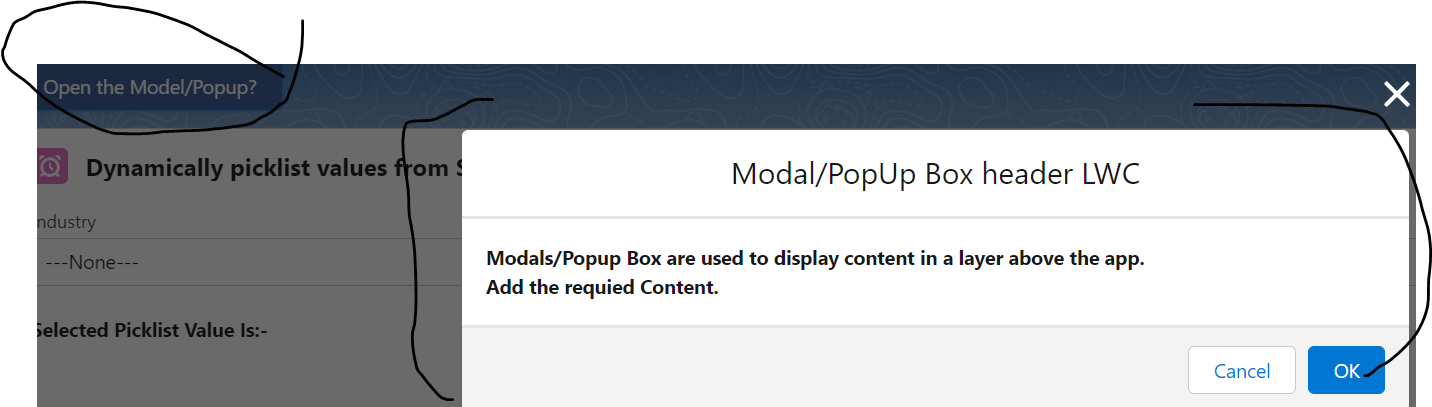
Push the changes on org and drag the component in record page and verify . OUTPUT will be as shown below
Comments
Post a Comment