Posts

Fetch Custom Setting Value in Apex

    Requirement : Disable the Apex trigger using custom setting: Solution : Create Custom setting:  SetUp>> Custom Setting >> New  Create Custom setting and create a check Box field with name On_Off__c  public class ClassName  {     public void onAfterUpdate(list<SOBJECT> triggerNew, map<id,SOBJECT> triggerNewMap, map<id,SOBJECT> triggerOldMap)     { // Write the Custom setting if On_Off__c = true then trigger method will be excute List<CustomSetting__C>  cstriggerOnOff = CustomSetting__C.getall().values(); if(cstriggerOnOff != null && cstriggerOnOff .size()>0){ if(cstriggerOnOff [0].On_Off__c == true) { MethodName(triggerNew, triggerNewMap, triggerOldMap); } }           }          private void MethodName(list<SOBJECT> triggerNew,map<id,SOBJECT> triggerNewMap,map<id,SOBJECT> ...
Search Contact Records Using Pagination in apex

Image
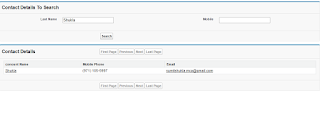
Requirement : Create a visual force page create a TextBox for Last Name and another is Mobile Phone when User enter the value then corresponding data should be visible in a table Solution: VFPageCode <apex:page controller="ContactMultipleSearchWithPagenationCLS" action="{!searchcon}">      <script type="text/javascript">         window.onload=function() {         // document.getElementById("{!$Component.thePb.thepbs.conName}").focus();         }        </script>      <apex:form >         <apex:pageBlock id="thePb" title="Contact Details To Search">             <apex:pageblockSection id="thepbs">                 <apex:inputField value="{!con.LastName}" required="false" id="conName"/>         ...

Open related list record on Custom Button Click on Parent Detail Page

Image
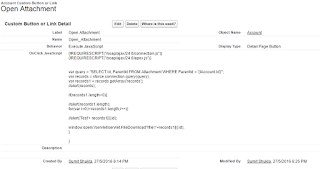
Requirement: Open All attachment record on a single button click means that , On Detail page of account there is custom button when click on this custom button open all attachment under the account Solution: Create a Custom Button on Account Level call a javaScript as mention below {!REQUIRESCRIPT("/soap/ajax/24.0/connection.js")}  {!REQUIRESCRIPT("/soap/ajax/24.0/apex.js")}  var query = "SELECT Id, ParentId FROM Attachment WHERE ParentId = '{!Account.Id}'";  var records = sforce.connection.query(query);  var records1 = records.getArray('records');  //alert(records);  if(records1.length>0){  //alert(records1.length);  for(var i=0;i<records1.length;i++){  //alert('Test'+ records1[i].Id);  window.open('/servlet/servlet.FileDownload?file='+records1[i].Id);  }  } Step 1 Create  a custom Button on Account Level and write the JavaScript code as mention above refer the screenshot ...

Some Useful Formula Fields

1) Get Week Day CASE(  MOD( DATEVALUE( CreatedDate ) - DATE( 1990, 1, 7 ), 7 ),  0, "Sunday",  1, "Monday",  2, "Tuesday",  3, "Wednesday",  4, "Thursday",  5, "Friday",  "Saturday"  ) 2) Get Month Year Based on PickList Values if(  ispickval(Status__c,'THIS_MONTH'),  (case(Month(Date__c),  1,"JAN",  2,"FEB",  3,"MARCH",  4,"APRIL",  5,"MAY",  6,"JUNE",  7,"JULY",  8,"AUG",  9,"SEP",  10,"OCT",  11,"NOV",  12,"DEC", " "  ) +'-'+ TEXT(year(Date__c))) ,  if(ispickval(Status__c,'NEXT_MONTH'),  (case(Month(Date__c) + 1 ,  1,"JAN",  2,"FEB",  3,"MARCH",  4,"APRIL",  5,"MAY",  6,"JUNE",  7,"JULY",  8,"AUG",  9,"SEP",  10,"OCT",...

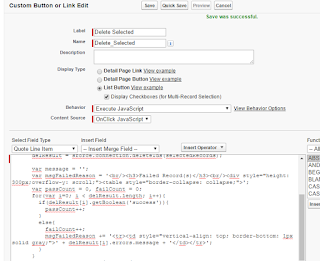
Deleted Selected multiple Row from Releated list using custom button

Image
Create a Custom button as a List Type Button and Execute JavaScript Code {!REQUIRESCRIPT('/soap/ajax/29.0/connection.js')} try {   var selectedRecords = {!GETRECORDIDS( $ObjectType.QuoteLineItem )};   if(selectedRecords.length < 1)     alert('Please Select at Least One Row !');   else   {     userConsent = confirm(selectedRecords.length + ' Record(s) will be Deleted. Continue ? ');     if(userConsent == true)     {       delResult = sforce.connection.deleteIds(selectedRecords);              var message = '';       var msgFailedReason = '<br/><h3>Failed Record(s)</h3><br/><div style="height: 300px;overflow-y: scroll;"><table style="border-collapse: collapse;">';       var passCount = 0, failCount = 0;       for(var i=0; i < delResult.length; i++){       ...

Add and Delete Row functionality using wrapper class

Image
Page Code <apex:page controller="AddandDeleteController">     <apex:form >             <apex:pageBlock title="Account Records">         <apex:pageMessages ></apex:pageMessages>             <apex:pageBlockButtons location="top">                 <apex:commandButton value="Add Row" action="{!addRow}" reRender="table" immediate="true"/>             </apex:pageBlockButtons>                 <apex:pageBlockTable value="{!accountwrapperList}" var="page" id="table">                      <apex:column headerValue="Name">                         <apex:inputField value="{!page.account.name}"/>   ...

Open Pop Up Box without using CSS

Image
Page Code <apex:page id="pg" controller="PopupScreenController">     <apex:form id="frm">         <apex:pageBlock title="PopUp" id="pb">             <apex:pagemessages id="msg"/>             <apex:commandButton value="Show Screen" onclick="opnePopup();" Oncomplete="refresh"/>                              <script type="text/javascript">                     var PopupBox;                     var strreason;                     var strcomment;                     PopupBox  = new SimpleDialog("test",false);                     Pop...