Posts

Pagination On Visual force Page Using StandardSetController

Image
Requirement:  Need to create a visual force page and add processed the records on selection of check boxes Solution: Class Name: public class ContactController {     Public class WrapperContactCls     {         public Contact con{get;set;}         public boolean isSelected{get;set;}         public WrapperContactCls(Contact c,boolean isSelected)         {             this.con = c;             this.isSelected = isSelected;         }     }       public String size { get; set; }     //This is Our collection of the class/wrapper objects WrapperContactCls     Public List<WrapperContactCls> wrapperlist;     Public Integer noOfRecords{get; set;}     // Create a new Map to verify whether the contact is al...

Send Quote Pdf to Contact Person and Save the Quote PDF in attachement

Requirement: Need to create the save and send Quote Pdf custom button on Quote detail page and when user click on this button quote pdf as attachment send to quote contact person and pdf attached in attachment under quote Solution: 1) Need to create web service class  2 ) Create a custom button as a Detail page button and  Behavior as Execute Java Script and content source is as onClick Java Script and call the web service class. WebServiceClass Name: global class clsSaveQuotePDFInAttachmentUnderQuote {      webservice static String AttachPDFToQuote(string Id){                string strResponse = '';         try         {             PageReference pageRef = new PageReference('/apex/VFPageName?Id='+Id);                          Blob content;         ...

Open Pdf On Quote Object using custom button as like standard Create pdf button

Requirement : Create a custom button on Quote detail page and open a vf page in pdf form same a Create pdf standard button functionality Solution: Create a custom button as a Detail page button and  Behavior as Execute Java Script and content source is onClick Java Script Paste the code as mention below {!REQUIRESCRIPT("/soap/ajax/24.0/connection.js")}  {!REQUIRESCRIPT("/soap/ajax/24.0/apex.js")}  var pdfOverlay = QuotePDFPreview.quotePDFObjs['quotePDFOverlay'];  pdfOverlay.dialog.buttonContents = '<input value=\"Cancel\" class=\"btn\" name=\"cancel\" onclick=\"QuotePDFPreview.getQuotePDFObject(\'quotePDFOverlay\').close();\" title=\"Cancelar\" type=\"button\" />';  pdfOverlay.setSavable(true);  pdfOverlay.setPDFContents('/apex/VFPageName?id={!Quote.Id}',null,null);  pdfOverlay.display(); Note: Change the VFpageName with your original VF Page name ...

Add Comma in Number Value in Visual force Page

<apex:outputText value="{0, number, ###,##0.00}">      <apex:param value="{!item.numberValue}"/>  </apex:outputText> Note: Comma depend on ### Output  : 589,700.00

Required to Fill Comment Before Approved/Rejected Using Apex Code

Requirement:  When User Approved or Rejected the approval then it is required to fill Approval  or Rejected reason Solution : You need to write the the trigger on Before Update as mention below     private void ApprovedOrRejectedComment(list<Sobject> triggerNew, map<id,Sobject> triggerOldMap) {  Map<Id, Sobject> MapIDToObject  = new Map<Id, Sobject>{};      for(Sobject objSobj: triggerNew) {     Sobject oldobjSobj = triggerOldMap.get(objSobj.Id); if (((oldobjSobj.Status != 'Approved'  && objSobj.Status == 'Approved' ) ||(oldobjSobj.Status != 'Rejected'  && objSobj.Status == 'Rejected')))              {  MapIDToObject.put(objSobj.Id, objSobj);   } }         if (!MapIDToObject.isEmpty())    { List<Id> processIn...

Get Longitude and Latitude from the Google Api

Image
Requirement: To get longitude and latitude of address using google api in salesforce. When Account is insert/update if account has shipping address then auto fill latitude and longitude values Soloution >> You need to hit google api call. it is free you can call it easily Note>>1)  Add end point URL in Remote site setting SetUp>> remoteSiteSetting>> AddURL:   https://maps.googleapis.com 2) Add two fields as a text type on Account object one is longitude  and othe is latitude  Longitude >> Longitude__c Latitude >> Latitude__c Step 1>> Need to Write trigger on Account Object You need to write two class and one trigger Class 1 /* This class is using for quering Billing address and call Google Map api and find the lattitue and long from API */ public  class AccountGetBillingAdress {   // toCheckFutueCall varibale is a boolean variable if it has alreday exist   ...

Open Service Console tab and Salesforce Classic using JavaScript on Custom Button in Salesforce

Requirement: Need to create a custom button on detail page, when click on it open in new tab in service console apps and salesforce classic Solutions: if (typeof(srcSelf) == 'function') {  // This is for Console app srcSelf('URL&isdtp=vw');  }  else {  // This is for salesforce classic window.open('URL');  } Notes: isdtp=vw : this is hide sidebar in consolse app URL  = '/500/e?CF00NN0000001i1d6={!MergeFieldAPINAME}&CF00NN0000001i1d6_lkid={!MergeFieldAPINAME}&ent=Case' In case of any issue please feel free call to me Thanks, Sumit Shukla skypeID : shuklasumit1 sumitshukla.mca@gmail.com Mob: 9711055997

Case Assignment Using Apex Code

Requirement: When Case will insert using apex code assignment check box should be true. Solution: List<Case> lstofCase = new List<Case>(); Case objCase = new Case();   ObjCase.status="New"; lstofCase.add(ObjCase); Insert lstofCase;  Database.DMLOptions dmo = new Database.DMLOptions();   dmo.assignmentRuleHeader.useDefaultRule = true;    system.debug(' dmo.assignmentRuleHeader.useDefaultRule***'+ dmo.assignmentRuleHeader.useDefaultRule);  Database.update(lstofCase, dmo);   Thanks, Sumit Shukla mob: 9711055997 skypeID: shuklasumit1 email ID: sumitshukla.mca@gmail.com

Pagination using SetController in Visual force Page and Maintain CheckBox Values

Image
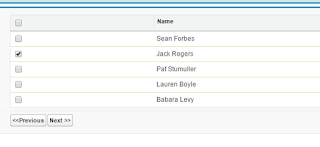
Requirement: Show the record on visual force page in table , user can select some record and click next and previous button and select more record and save the selected data Solution: Step 1: Create a Class / / This is class have logic to show the record per page and store the session after //click on next and previous button global class  CustomIterable implements Iterator<list<ContactWrapper>> {     list<ContactWrapper> InnerList{get; set;}    list<ContactWrapper> ListRequested{get; set;}    Integer i {get; set;}     public Integer setPageSize {get; set;}     public CustomIterable(List<ContactWrapper> lstAccWr)    {        InnerList = new list<ContactWrapper >();         ListRequested = new list<ContactWrapper >();             InnerList = lstAccWr; ...