Posts

Open Service Console tab and Salesforce Classic using JavaScript on Custom Button in Salesforce

Requirement: Need to create a custom button on detail page, when click on it open in new tab in service console apps and salesforce classic Solutions: if (typeof(srcSelf) == 'function') {  // This is for Console app srcSelf('URL&isdtp=vw');  }  else {  // This is for salesforce classic window.open('URL');  } Notes: isdtp=vw : this is hide sidebar in consolse app URL  = '/500/e?CF00NN0000001i1d6={!MergeFieldAPINAME}&CF00NN0000001i1d6_lkid={!MergeFieldAPINAME}&ent=Case' In case of any issue please feel free call to me Thanks, Sumit Shukla skypeID : shuklasumit1 sumitshukla.mca@gmail.com Mob: 9711055997
Case Assignment Using Apex Code

Requirement: When Case will insert using apex code assignment check box should be true. Solution: List<Case> lstofCase = new List<Case>(); Case objCase = new Case();   ObjCase.status="New"; lstofCase.add(ObjCase); Insert lstofCase;  Database.DMLOptions dmo = new Database.DMLOptions();   dmo.assignmentRuleHeader.useDefaultRule = true;    system.debug(' dmo.assignmentRuleHeader.useDefaultRule***'+ dmo.assignmentRuleHeader.useDefaultRule);  Database.update(lstofCase, dmo);   Thanks, Sumit Shukla mob: 9711055997 skypeID: shuklasumit1 email ID: sumitshukla.mca@gmail.com

Pagination using SetController in Visual force Page and Maintain CheckBox Values

Image
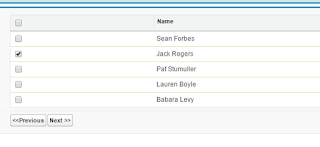
Requirement: Show the record on visual force page in table , user can select some record and click next and previous button and select more record and save the selected data Solution: Step 1: Create a Class / / This is class have logic to show the record per page and store the session after //click on next and previous button global class  CustomIterable implements Iterator<list<ContactWrapper>> {     list<ContactWrapper> InnerList{get; set;}    list<ContactWrapper> ListRequested{get; set;}    Integer i {get; set;}     public Integer setPageSize {get; set;}     public CustomIterable(List<ContactWrapper> lstAccWr)    {        InnerList = new list<ContactWrapper >();         ListRequested = new list<ContactWrapper >();             InnerList = lstAccWr; ...

Select and Deselect Check Box on Page Block Table in Visual force Using JavaScript

Image
Requirement: Using javascript select all and Deselect all checkbox in pageBlock Table Solution <apex:page sidebar="false" Controller="ManageOppController">     <script>         function selectAllCheckboxes(obj,receivedInputID){             var inputCheckBox = document.getElementsByTagName("input");                               for(var i=0; i<inputCheckBox.length; i++){                           if(inputCheckBox[i].id.indexOf(receivedInputID)!=-1){                                                          inputCheckBox[i].checked = obj.checked;                 }     ...

Salesforce Spring 16 Release Exam (Maintenance Exam Q&A) for Developer 201 Admin

Spring 16 Salesforce Admin 201 Maintenance Exam 1. Which areas are calculated for the Health Check score? Choose 2 answers A. Number of users B. Session Settings  C. Profiles and Permissions assigned D. Password Policy E. Login attempts 2. What key user access data is included in login forensics? A. Who logged in from a new browser more than once in a day. B. Who logged in more than the number set in the profile. C. Who logged in during business hours. D. Who logged in more than the average number of times. 3. What is true regarding the new Data Loader? A. It has a new column flagging duplicate files. B. It supports Web Server OAuth Authentication for Windows or Mac. C. It has downloadable add-ons published through the AppExchange. D. It works with all legacy security protocol. 4. What does the Customize Application permission setting allow? A. To create article types. B. To edit contract settings. C. To modify custom picklist values. D. To create a...

Salesforce Spring 16 Release Exam (Maintenance Exam Q&A) for Developer 401

1 ) What is true about the file sharing “Set by Record?” A) It is used to infer sharing via the record type. B) It is used to infer sharing via the record owner. C) It is used to infer sharing via the parent record. D) It is used to infer sharing via the associated record. 2) Which Quick Actions can contain a “Custom Success Message?” Choose 2 answers A) Send an Email B)Visit a website C)Log a Call D)Update a Record 3) What is true about dataloader? Choose 3 answers A) It can be used with OAuth Authentication B) It can be used with Password Authentication C) It can be used with both Mac and PC . D) It can be used with only a PC. E)It can be used with SAML Authentication. 4) Which standard field can be updated using formal rules in process builder? A) Owner Id B) Deleted C) Created Date D) Id 5) What must be true when accessing a user’s private reports and dashboards? Choose 2 answers A) Having the “Administrator Access to Private Files” permission...

Parse XML using APEX

string  xmlstring =  '<?xml version="1.0" encoding="UTF-8"?><OTPResp status="1" ts="2016-06-09T17:24:46" txn="20160609172112021" resCode="ad3198bda02e3742571c855b50c576de2e8c8641" errCode="" errMsg=""></OTPResp>';                                     DOM.Document xmlDOC = new DOM.Document();                    xmlDOC.load(xmlstring);                    DOM.XMLNode rootElement = xmlDOC.getRootElement();                    //outxmlstring=String.valueof(xmlDOC.getRootElement().getChildAttribute());                     outxmlstring=String.valueof(rootElement.getAttributeValue('status',null));                     outxm...

Calculate the Column values at visual force page

Requirement: Calculate total quantity on visualforce page Solution:  <apex:page>   <form>  <apex:variable var="countqu" value="{!0}"/>   <apex:repeat var="count" value="{!lst}" >  <td > <apex:variable var="countqu" value="{!(countqu + round(count.quantity__c,0 ))}"/> <apex:outputtext value="{!round(count.quantity__c,0 )}" /> </td>   </apex:repeat   >   <td>{!countqu} </td> </form> </apex:page> OUT PUT : Quantity  10 20 30 40 ---------- 100 ( calculate on vf Page) --------

Fetch Custom Setting Value in Apex

    Requirement : Disable the Apex trigger using custom setting: Solution : Create Custom setting:  SetUp>> Custom Setting >> New  Create Custom setting and create a check Box field with name On_Off__c  public class ClassName  {     public void onAfterUpdate(list<SOBJECT> triggerNew, map<id,SOBJECT> triggerNewMap, map<id,SOBJECT> triggerOldMap)     { // Write the Custom setting if On_Off__c = true then trigger method will be excute List<CustomSetting__C>  cstriggerOnOff = CustomSetting__C.getall().values(); if(cstriggerOnOff != null && cstriggerOnOff .size()>0){ if(cstriggerOnOff [0].On_Off__c == true) { MethodName(triggerNew, triggerNewMap, triggerOldMap); } }           }          private void MethodName(list<SOBJECT> triggerNew,map<id,SOBJECT> triggerNewMap,map<id,SOBJECT> ...

Search Contact Records Using Pagination in apex

Image
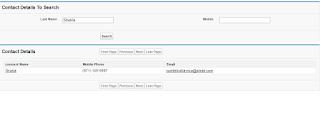
Requirement : Create a visual force page create a TextBox for Last Name and another is Mobile Phone when User enter the value then corresponding data should be visible in a table Solution: VFPageCode <apex:page controller="ContactMultipleSearchWithPagenationCLS" action="{!searchcon}">      <script type="text/javascript">         window.onload=function() {         // document.getElementById("{!$Component.thePb.thepbs.conName}").focus();         }        </script>      <apex:form >         <apex:pageBlock id="thePb" title="Contact Details To Search">             <apex:pageblockSection id="thepbs">                 <apex:inputField value="{!con.LastName}" required="false" id="conName"/>         ...