Posts

Dynamic SOQL based on Sobject Name and Where Clause

 public class DynamicSOQLUtil {     // Returns a dynamic SOQL statement for the whole object, based on object name and where clause as a dynamic     public static string getCreatableDynamicFieldsSOQL(String objectName, String whereClause){                  String selects = '';         // Check whereclause if null then return null         if (whereClause == null || whereClause == ''){ return null; }                  // Get a map of field name and sobject field         Map<String, Schema.SObjectField> objFieldMap = Schema.getGlobalDescribe().get(objectName.toLowerCase()).getDescribe().Fields.getMap();         list<string> selectFields = new list<string>();                  if (objFieldMap != null){           ...
Get fields in SOQL from FIeldSet

global class BatchclassName implements Database.Batchable<sObject>, Database.Stateful, Database.AllowsCallouts{       global Database.QueryLocator start(Database.BatchableContext bc) {         return gAllRecords();     public Database.QueryLocator gAllRecords(){      try{ //Create fieldset on Object and get fields in SOQL query, BankFieldSet this fieldset name on bank object String queryString = 'Select Id'; for(Schema.FieldSetMember fieldMember : sObjectType.Bank__c.FieldSets.BankFieldSet.getFields()){ queryString += ', '+fieldMember.getFieldPath();} system.debug('queryString@@@'+queryString); queryString+=' FROM Bank__c WHERE isActive__c =true AND Location__c=\'Noida\' AND IsNeeded__c= true AND Status__c IN (\'Failed\',\'Unsuceess\') LIMIT '+Integer.valueOf(Label.LabelName); return Database.getQueryLocator(queryString); }catch(Exception ex){ ErrorLog__c log = new ErrorLog__c(); log...

In Schedule class run next job from configuration level

global class Schedularclassname implements Schedulable {   global void execute(SchedulableContext SC) {        List<AsyncApexJob> jobs = new List<AsyncApexJob>(); Id thisClassId = [SELECT Id, Name FROM ApexClass WHERE name = 'BatchClassName' LIMIT 1].Id; //Setup Custom Setting Schedular_Settings__c store the time and no of record process in batach class  //Scheduled_Time__c  store time when next batch will run //Schedular_Records__c add batch size how many record will process Schedular_Settings__c objschedule = Schedular_Settings__c.getInstance('Schedular'); if(objschedule!=null && objschedule.Scheduled_Time__c != null && objschedule.Schedular_Records__c != null){ jobs = [select id from AsyncApexJob where (status = 'Processing' OR status = 'Holding' OR status = 'Queued' OR status = 'Preparing') AND ApexClassId = :thisClassId AND JobType = 'BatchApex']; if(jobs == null  || jobs.size()...

Get Last day of Month

Get Last day of a month (28, 29, 30 or 31)? Formula DAY(ADDMONTHS(DATE(YEAR(DateField__c), MONTH(DateField__c),1),1)-1) The trick here is to take the 1st of the month and year of the date field, add 1 month to it and subtract 1 day. For example, if my date field is March 3rd 2022, the formula will add 1 month to March 1st 2022 and will return April 1st 2022. We then subtract 1 day to get March 31st 2022.

Generate Random String

 DateTime currentDate = DateTime.now(); String randstring = currentDate.format('ddMMHHmmss'); Integer randomNumberToAppend = null; while(true){     randomNumberToAppend = Integer.valueOf(Math.random()*10000);     if(String.valueOf(randomNumberToAppend).length()==4){         break;     } } randstring += randomNumberToAppend; System.debug('randstring@@@'+randstring);

WAT if the owner of an account is changed then the owner of the related contacts should also be updated.

 Account Trigger ============================================ trigger AccountTrigger on Account (after update) {   Set<ID> accountId = new Set<ID>();   if(Trigger.IsAfter && Trigger.IsUpdate){     for(Account objAcc : trigger.new){       if(trigger.oldMap.containsKey(objAcc.id)){         if(trigger.oldMap.get(objAcc.id).OwnerId != objAcc.OwnerId){           accountId.add(objAcc.Id);         }       }     }     if(accountId != null && accountId.size() > 0 ){       AccountTriggerHandler.UpdateOwnerofContact(Trigger.newMap, accountId);     }   } } ============================================ AccountTriggerHandler Class public with sharing class AccountTriggerHandler {   public static void UpdateOwnerofContact(Map<Id,Account>accountMap,Set<id>accountId){     List<...

Get Interface Class List from SOQL

ApexTypeImplementor Object: Get the list of all classes which implement a particular interface with the help of ApexTypeImplementor object. List<ApexTypeImplementor> lstofbatchclass =[SELECT Id,ClassName FROM ApexTypeImplementor WHERE InterfaceName = 'Batchable']; https://developer.salesforce.com/docs/atlas.en-us.object_reference.meta/object_reference/sforce_api_objects_apextypeimplementor.htm

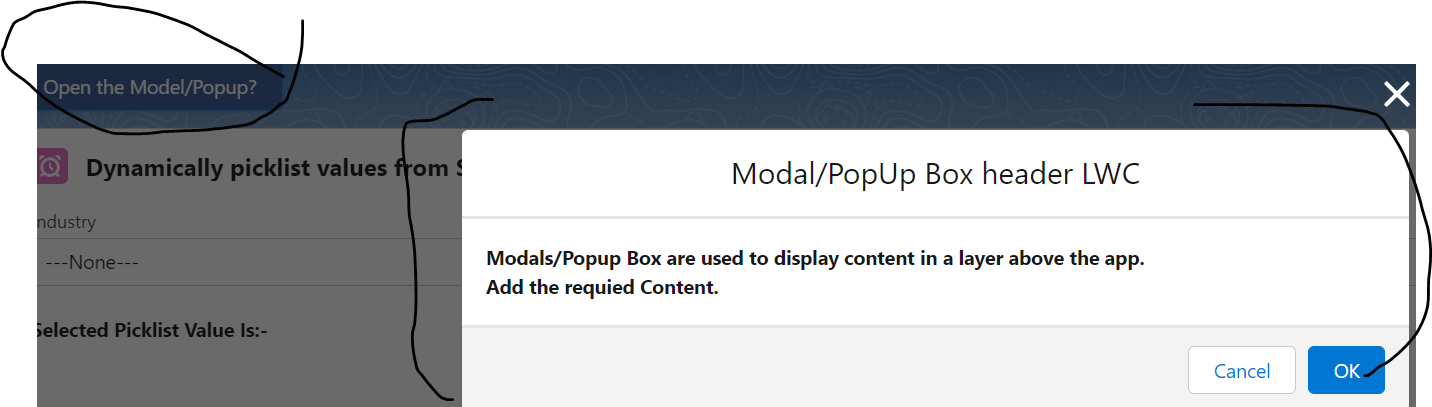
Open the Model Popup in LWC

Image
 Create the LWC //HTML FILE CODE <template>     <!-- lightning button for open modal window -->     <lightning-button variant="brand"        label="Open the Model/Popup?"        title="Open the Model/Popup?"        onclick={openModal}        class="slds-m-left_x-small">     </lightning-button>     <!--Use template if:true to display/hide popup based on isModalOpen value-->      <template if:true={isModalOpen}>         <!-- Modal/Popup Box LWC starts here -->         <section role="dialog" tabindex="-1" aria-labelledby="modal-heading-01" aria-modal="true" aria-describedby="modal-content-id-1" class="slds-modal slds-fade-in-open">             <div class="slds-modal__container">               ...

Fetch Picklist value in LWC using Schema class

Image
 Create the Apex Class: public with sharing class lwcPicklistController {          //fetch picklist values from  SOBJECT     @AuraEnabled(cacheable=true)     public static List < customValueWrapper > pickListValueDynamically(sObject customObjInfo, string selectPicklistApi) {        Schema.DescribeSObjectResult objDescribe = customObjInfo.getSObjectType().getDescribe();             map < String, Schema.SObjectField > customFieldMap = objDescribe.fields.getMap();              list < Schema.PicklistEntry > custPickValues = customFieldMap.get(selectPicklistApi).getDescribe().getPickListValues();        list < customValueWrapper > customObjWrapper = new list < customValueWrapper > ();        for (Schema.PicklistEntry myCustPick: custPickValues) {         ...

Salesforce Spring 21 Release Notes points related to Salesforce Admin

Lightning Flow Is Now Salesforce Flow The Lightning Flow suite of features is now called Salesforce Flow, and it still includes all your processes and flows. Lightning Flow Builder and Lightning Process Builder are now called Flow Builder and Process Builder.