Posts

Copy Billing Address to Shipping Address on VF Page Using JavaScript
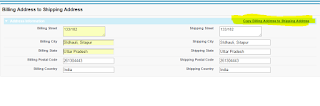
Image
Class Code public class CopyAddressFromBillToShip{     public String BCountry { get; set; }     public String BZip { get; set; }     public String BState { get; set; }     public String BCity { get; set; }     public String BStreet { get; set; }     public String SCountry { get; set; }     public string SZip { get; set; }     public String SState { get; set; }     public String SCity { get; set; }     public String SStreet { get; set; } } Page Code <apex:page controller="CopyAddressFromBillToShip" >    <apex:form id="myform">     <script type="text/javascript">         function addressCopy(bstreet1, bcity1, bstate1, bPostalCode1, bcountry1, sstreet1, scity1, sstate1, SPostalCode1, scountry1) {     document.getElementById(sstreet1).value = document.getElementById(bstreet1).value;   ...
How to Add Custom Error Message on Catch

Code: try {           // Code Logic } catch(Exception e){ if(e.getMessage().contains('FIELD_CUSTOM_VALIDATION_EXCEPTION, Enter valid Date')) { Apexpages.addMessage(new ApexPages.Message (ApexPages.Severity.ERROR, 'Please Enter valid Date')); return Null;  }  else if(e.getMessage().contains('FIELD_CUSTOM_VALIDATION_EXCEPTION,  Too Large Data')) { Apexpages.addMessage(new ApexPages.Message (ApexPages.Severity.ERROR, 'Please fill 20 character data in field'));  } else {       ApexPages.addmessage(new ApexPages.message(ApexPages.severity.ERROR,e.getmessage()));         return Null; }  } 

Get Field Label With API name using Describe Call

Map<String,String>  mapFieldLebelToApiName  = new Map<String,String>(); Map<String, Schema.SObjectField> fieldsMap = Schema.SObjectType. SobjectName .fields.getMap();       system.debug('fieldsMap****'+fieldsMap);        system.debug('fieldsMapvalues****'+fieldsMap.values());       for (Schema.SObjectField field : fieldsMap.values()){                   mapFieldLebelToApiName .put(field.getDescribe().getLabel(), field.getDescribe().getName());                           }   

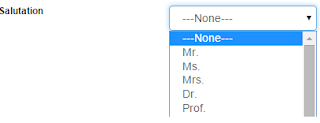
Get Picklist Value Using Describe Call on VF Page

Image
Requirement: Get Contact Salutation on VF page  Class Code  public Contact objcontact {get;set;}  public List<SelectOption> getContactSalutations()      {            List<SelectOption> options = new List<SelectOption>();         options.add(new SelectOption('','---None---'));          //For fetching Picklist Values         Schema.DescribeFieldResult fieldResult =         Contact.Salutation.getDescribe();         List<Schema.PicklistEntry> ple = fieldResult.getPicklistValues();                     for( Schema.PicklistEntry f : ple)         {                             options.add(new SelectOption(f.getLabel(),f.getLabel())); ...

Some Very useful Salesforce Links

http://sfdchack.blogspot.in/ http://blog.jeffdouglas.com/

Create Custom Lookup in salesforce

Image
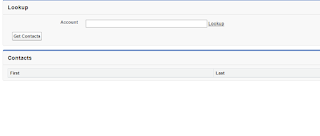
Requirement : Create a custom Lookup Solution : you need to create two visual force page Create first VF Page and Class Page Code <apex:page controller="LookupMainControllerForFilter" tabstyle="Account"> <script>     var newWin=null;     function openLookupPopup(name, id)     {         var url="/apex/LookupExamplePopup?namefield=" + name + "&idfield=" + id;         newWin=window.open(url, 'Popup','height=500,width=600,left=100,top=100,resizable=no,scrollbars=yes,toolbar=no,status=no');         if (window.focus)          {             newWin.focus();         }                      return false;     }                        function closeLookupPopup()   ...

Wild Card Searching SOQL in Salesforce

Image
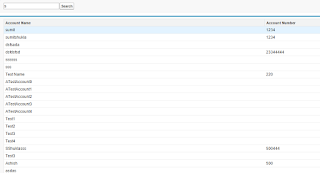
Requirement : Data Filter Based on any Character  Page Code <apex:page controller="wildcardController">   <apex:form >     <apex:pageblock >                  <apex:inputtext value="{!inputtext}"/>         <apex:commandbutton value="Search" action="{!searchRecords}" reRender="ss,msgid"/>     </apex:pageblock>     <apex:pageblock id="pbId">       <apex:pageblocktable value="{!accList}" var="acc" id="ss">         <apex:column value="{!acc.name}"/>         <apex:column value="{!acc.accountnumber}"/>       </apex:pageblocktable>     </apex:pageblock>     <apex:outputLabel value="{!str}" id="msgid"></apex:outputLabel>   </apex:form> </apex:page> Class Code Public class wildcar...

Filter Contact Based on Account

Image
Requirement : Created a VF Page . Show All Accounts on Drop Down List, When Select Account then related contacts with that Account should be visible in table. Solution :   Create a VF page and Controller Class as mention below Page Code <apex:page controller="ControllerforAccount">  <apex:form >      <apex:pageBlock >          <apex:pageBlockSection columns="1" title="Account">                              <apex:selectList value="{!selectedAccountId}" size="1">              <apex:selectOptions value="{!lstSelectOption}"></apex:selectOptions>           <apex:actionSupport event="onchange" action="{!AllContact}" reRender="contactlistId,outputID"/>       </apex:selectList>             ...

Make Salesforce calendar year drop-down to show earlier years

Image
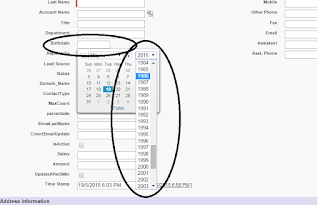
Requirement: The birthdate field on the Contact object doesn’t show previous year and neither does it allow to switch back and forth the Years part easily. Solution: Below example will show the last 100 years. Go to Setup -> App Setup -> Customize -> User Interface. Here make sure the ‘Show Custom Sidebar Components on All Pages’ is checked. Go to Setup -> App Setup -> Home Page Layouts. Make sure all your Home Page Layouts have the Messages & Alerts component checked. Go to Setup -> App Setup -> Home Page Components. Here, click edit for Messages & Alerts. In the textarea, copy and paste the javascript code below and save (it can just go below your normal Messages & Alerts, won’t show up on the actual page). <script src="/js/dojo/0.4.1/dojo.js"></script> <script src="/soap/ajax/11.1/connection.js" type="text/javascript"></script> <script type="text/javascript"> dojo.requ...

Call Rest Api and Json Parsing in Salesforce

Image
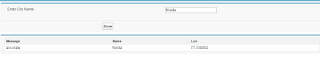
Requirement : To Call Current weather api show data on VF page, Based on Search City Solution:  Call the rest api and parse the json and one more thing add End Point url in Remote Site Setting First Step : Create a Class and Parse the JSON data Create Class: CurrentDayWeatherApiController  Class Code: public class CurrentDayWeatherApiController {            public string cityName{get;set;}        //   public boolean showpanel{get;set;}                    public List<weatherRecords> WeathersList{get; set;}     public CurrentDayWeatherApiController()     {     }     public void ShowWeather()         {                        try           {            ...